Collaboration Without Compromise: Building a Review Workflow That Scales
Frame-accurate feedback, GPU-accelerated transcoding, and WebSocket sync at under 100ms, the building blocks of a review workflow that does not break under load.
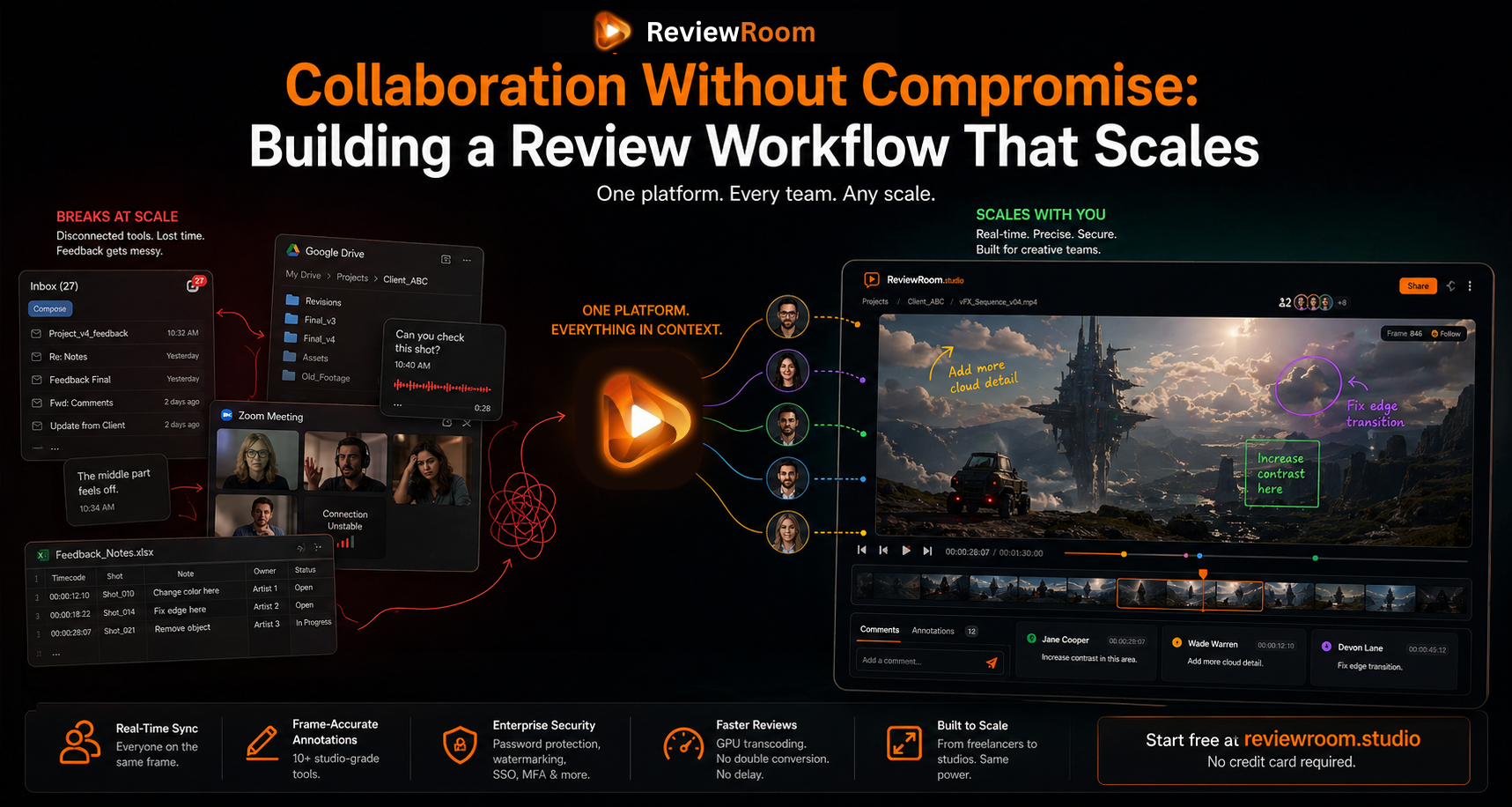
A freelancer sending a Drive link and waiting two days for feedback in three separate voice notes. A studio on its tenth Zoom call this week because the screen share kept lagging. A VFX supervisor copying notes from an email thread into a spreadsheet so artists can figure out which shot each note belongs to.
These things work. Just barely. And the gap between barely works and actually works well is exactly where projects lose time, creative momentum, and sometimes the quality of the output itself.
The question is not whether your current review process functions. The question is whether it still functions when the team grows, the client list doubles, and the file formats get heavier. Most informal review setups do not survive that transition intact.
Key Takeaways
- The double conversion problem, pre-converting before upload, then server transcoding again, burns 30 to 60 minutes per review cycle for EXR and ProRes projects. ReviewRoom eliminates both steps with local GPU transcoding.
- Every annotation, comment, and timeline scrub syncs across all connected reviewers in under 100ms via WebSocket. There is no per-seat collaborator limit at any plan level.
- Password protection, watermarking, and end-to-end encryption are available from $5 per user per month. No enterprise contract required.
- Raw EXR and source files never leave your machine at any point. Only the browser-ready transcoded proxy is uploaded.
What the Old Approach Cannot Handle
Email threads and general file sharing tools have a ceiling. They work fine for simple, low-volume communication. The moment you add a second client contact, a remote supervisor, and an asset in EXR or ProRes format that the sharing platform cannot play, the seams start to show.
The Double Conversion Problem
Most cloud review platforms require a manual conversion before upload, and then their server transcodes it again for browser playback. For a VFX team working with EXR sequences or ProRes, that double conversion can burn 30 to 60 minutes before anyone in the session has seen a single frame, per review cycle, on every project. The Visual Effects Society's pipeline guidelines recognise EXR as the standard interchange format for high-dynamic-range imagery in VFX workflows, which is precisely why most cloud tools cannot handle it without conversion steps. ReviewRoom eliminates both steps. The desktop app transcodes directly on your own GPU, whether NVIDIA, AMD, Apple Silicon, or Intel, producing a browser-ready H.264 MP4 in minutes. Raw EXR and ProRes files never leave your machine. Only the lightweight transcoded proxy gets uploaded through a global CDN. The result is a cycle that is at least twice as fast, and raw footage that stays on local hardware where it belongs.
A Grammarly and Harris Poll study found that poor communication costs U.S. businesses $1.2 trillion annually, with 100% of knowledge workers reporting miscommunication at least weekly Grammarly / Harris Poll: U.S. Businesses Lose $1.2 Trillion Annually to Poor Communication For creative teams where feedback precision directly determines output quality, that cost compounds on every revision cycle.
OpenEXR, maintained by the Academy Software Foundation, is the industry standard HDR image format used throughout VFX and animation pipelines: OpenEXR: High Dynamic Range Image Format Its specification explains why proprietary decoders are required and why generic cloud platforms cannot transcode it without pre-conversion.
The Precision Problem
When feedback lives in an email, it is separated from the frame it refers to. The client knows what they meant. The artist reading the note two days later has to reconstruct that from language without the image in front of them. That reconstruction gap is where revision rounds multiply, not because the work is wrong, but because the feedback was never precise enough to close on the first pass.
How ReviewRoom Keeps the Workflow Precise at Any Scale
Real-Time Sync at Under 100ms
Every annotation, comment, and timeline scrub syncs across all connected reviewers in under 100 milliseconds via WebSocket. There is no per-seat limit on collaborators. When the session lead is on frame 846, every participant is on frame 846. Follow mode locks everyone to the lead's playback in lockstep, so no one drifts to a different part of the sequence mid-session. A freelancer reviewing with one client and a studio bringing eight stakeholders into the same session run on identical infrastructure.
10+ Studio-Grade Annotation Tools, On the Frame
Paintbrush, calligraphy, smooth line, arrows, shapes, and text across 8 brush textures with full stylus pressure sensitivity. Every mark syncs live. A colorist can draw the exact gradient they want adjusted. A supervisor can circle the matte edge that is cutting incorrectly. A client can point to the thing they cannot put into words. These annotation threads are anchored to timecode, so the note on frame 612 is still sitting at frame 612 when the artist opens the project the next day, not in a separate document, right there in the timeline.
Sessions export as annotated PNG frames, collected PDF feedback reports, and transcoded MP4s. The PDF report alone changes how formal client approvals work on a production.
Wipe and Opacity Comparison for Version Reviews
ReviewRoom includes wipe and opacity blend comparison modes for checking revisions against each other on the same frame. Eyeballing whether a revision addressed a note is not a review. Putting two versions directly against each other is.
Security That Scales Without an Enterprise Contract
A mid-size studio handling pre-release content and a freelancer sharing a confidential commercial grade both need security controls that do not require a bespoke contract. ReviewRoom builds these into the standard plans:
- Password-protected sharing links that require a password even if the URL is forwarded
- Domain-restricted invites so only addresses from a specific organisation can be granted access
- Customisable watermarking with configurable text, opacity, and position on every frame
- End-to-end encryption in transit and at rest
- Raw EXR and source files never uploaded to ReviewRoom's servers at any point
- Enterprise adds SSO via SAML 2.0, MFA, dedicated server infrastructure, and custom branding
Password protection and watermarking are available from the Pro plan at $5 per user per month. Security at that price point is not something studios had to justify to a finance team a few years ago. Now it is just part of the tool.
Pricing Built for Every Size of Operation
The Free plan includes 2 GB of storage per user, unlimited collaborators, and full access to core review features including frame-accurate comments and annotations, with no credit card required. Pro at $5 per user per month adds 50 GB, up to 5 seats, and password-protected sharing. Studio at $10 adds 250 GB of shared storage, up to 25 seats, cloud transcoding as a fallback, and advanced brush tools. Enterprise at $24 adds dedicated infrastructure, SSO, MFA, and custom branding. All paid plans come with a 14-day free trial.
The free tier is not a preview with artificial limits. A solo artist can run complete client reviews on it before spending anything, and the experience is the same infrastructure that the paid plans build on.
Same Tool, Every Scale
A freelance colorist uploads a grade. The client gets a password-protected link, opens it in a browser, draws on the frame, leaves a note at the timecode, and closes the tab. The colorist opens the session, sees the annotation at the exact frame, makes the change, closes the revision in one pass.
A VFX studio runs a live session with a director in follow mode. Eight people on the call, all locked to the same frame. The director uses the smooth line tool to draw a lighting note at frame 412. The session ends. The lighting artist opens their notes, sees the annotation at frame 412, knows exactly what was asked without a call.
Same product. Same infrastructure. The workflow does not break when the team gets bigger. That is the point.
Frequently Asked Questions
Q: What file formats does ReviewRoom support for review?
A: Standard formats including MP4, MOV, WEBM, and WMV upload via browser drag-and-drop. Professional formats including EXR, ProRes, R3D, BRAW, H.265, MKV, and AVI are handled by the desktop client, which transcodes locally on your GPU before upload.
Q: How does ReviewRoom handle security for pre-release or NDA content?
A: Raw source files never leave your machine. Only the browser-ready transcoded proxy is uploaded. Sharing is controlled via password-protected links, optional domain-restricted invites, customizable watermarks, and end-to-end encryption in transit and at rest.
Q: Is the free plan genuinely usable, or does it have artificial limits?
A: The free plan includes 2 GB per user, unlimited collaborators, and the same core review infrastructure as paid plans. You can run complete client reviews on it without spending anything before deciding whether to upgrade.
ReviewRoom is free to start at reviewroom.studio.
Try ReviewRoom free
Fast, secure video and image review for creative teams. Free plan available, no credit card required.
Start Collaborating Free