Synchronized Playback, Live Annotations, Sub-Second Latency: What Real-Time Review Actually Requires
Synchronized playback, live annotations, and sub-second latency, the three things that make a review session feel like being in the same room.
Every editor knows the loop. You export a cut, upload it, send a link, and wait. The client watches it on their own time. They write notes in an email, or worse, in a Word doc with timestamps that do not quite match your timeline. You read the notes, try to imagine what they meant by 'the energy drops here,' make changes, and start the loop again.
Multiply that by three or four reviewers and a tight deadline, and the feedback loop becomes the project. The actual editing is the easy part.
Real-time video review changes the shape of that loop entirely. Instead of asynchronous notes that arrive hours later and require interpretation, the conversation happens while everyone is watching the same frame at the same time.
Key Takeaways
- True real-time review requires three things: synchronized playback, live annotations, and sub-second latency. Shared comments that update on refresh are not real-time, they are faster email.
- Email creates context decay: a note written Monday evening, read Tuesday morning, and addressed Wednesday afternoon has passed through three different mental states.
- Director sessions, color and finishing, and multi-stakeholder approvals see the fastest gains from switching to synchronized review.
- To test any review tool, open the same playlist on two devices across different networks, scrub on one, and see if the other follows within a frame.
What Real-Time Review Actually Means
The phrase gets used loosely. Many tools claim real-time collaboration but really mean shared comments that update on refresh. That is not real-time. That is a faster version of email.
True real-time review has three properties:
- Synchronized playback, when one person scrubs, pauses, or plays, everyone else's player follows. The group is always on the same frame.
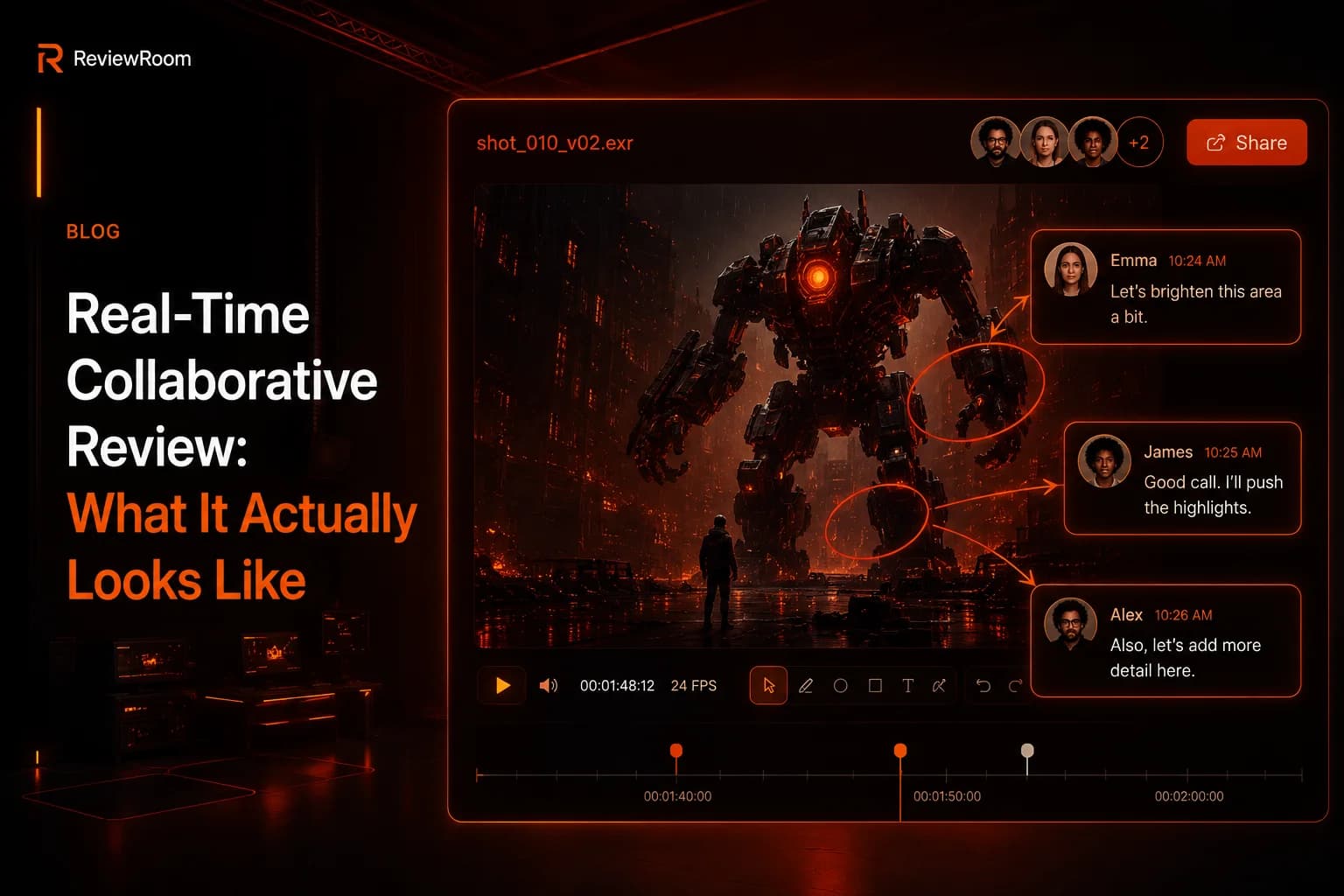
- Live annotations, drawings, arrows, and comments appear on every screen as they are made, not after a refresh.
- Sub-second latency, feedback feels like a conversation, not a chat log. If it lags, people start talking over each other and the flow breaks.
When all three are in place, a thirty-minute review covers what a week of email could not.
Why Email Threads Break Creative Work
Written feedback is precise about words but terrible about timing. 'Cut the second beat short' depends on which beat the reviewer was counting. 'Make it punchier around 0:42' depends on whether the reviewer's clock matched yours. The editor ends up doing detective work before they can do creative work.
There is also the matter of context decay. A note written on Monday evening, read on Tuesday morning, and addressed by Wednesday afternoon has been through three different mental states. The reviewer no longer remembers exactly what they meant. The editor is guessing. The result is usually a half-fix that triggers another round of notes.
Gallup research found that 48% of managers cite communication and 44% cite collaboration as their top challenges in hybrid and remote team environments Gallup: Managing Remote and Hybrid Workers Real-time synchronized review addresses both directly, replacing asynchronous communication failures with live, frame-accurate feedback.
Real-time review collapses that timeline. The note happens while the reviewer is feeling the cut. The editor sees the drawing on the exact frame. The conversation that resolves it takes ten seconds, not three days.
Where It Changes the Workflow
Three places where teams notice the difference fastest:
Director Sessions
Remote directors used to mean Zoom calls with screen sharing, which meant compressed video, audio drift, and 'can you scrub back five seconds, no, more, no, too far.' With synced playback, the director sees the master quality stream on their own screen and controls the timeline like they are sitting next to the editor. The session feels like the room.
Color and Finishing
Color review is unforgiving. A note about skin tones in a frame is meaningless if the frame on the colorist's monitor and the frame on the supervisor's monitor are not actually the same one. Synced scrubbing means both people are guaranteed to be looking at the same data at the same moment. That changes color sessions from a series of guesses into a real conversation.
Multi-Stakeholder Approvals
Agency cuts often need a producer, a creative director, and a brand client all signing off. Sequencing those reviews by email turns a one-day approval into a two-week round trip. Bringing them into a single live session, even for twenty minutes, gets the decisions made together. The notes that emerge are aligned, not contradictory.
What to Look for in a Real-Time Review Tool
If you are evaluating tools, the marketing pages will all sound the same. Test for these behaviors directly:
- Open the same playlist on two devices on different networks. Scrub on one. Does the other follow within a frame, or is there a noticeable lag?
- Draw an annotation on a paused frame. Does it appear on the other device immediately, or after a refresh?
- Try it with a long-form file, not just a thirty-second clip. Some tools fall apart on anything longer than a short social video.
- Check what happens when one reviewer has a slow connection. Does the session degrade gracefully, or does it block everyone?
If a tool passes those four tests, it will hold up in a real session. If it fails any of them, you will feel it the first time the stakes are high.
The Shift in How Teams Talk About Work
The deeper change is cultural. When feedback is live, it sounds different. People say 'try this' instead of writing 'consider revising.' They build on each other's ideas instead of submitting parallel notes that contradict. The editor is part of the conversation, not the recipient of a list.
Email threads make every reviewer sound like a critic. Real-time review makes them sound like a collaborator. That is not a small difference. Over the life of a project, it determines whether the team finishes the cut feeling like they made something together or like they survived a process.
Getting Started
You do not need to overhaul a workflow to try this. Pick the next round of internal review on a current project, run it as a live session instead of an email thread, and time the difference. Most teams do not go back. Once a director has scrubbed your timeline from across the country and circled a frame in real time, the old loop starts to feel like sending faxes.
Frequently Asked Questions
Q: Is real-time video review the same as screen sharing over Zoom?
A: No. Screen sharing compresses video quality and degrades it at the exact moments you need precision. Real-time review in a tool like ReviewRoom delivers full-quality playback to each participant, with a shared playback state and annotation tools built into the same interface. No narrating what you see, you point directly to the frame.
Q: How many people can join a real-time review session in ReviewRoom?
A: ReviewRoom has no per-seat limit on collaborators. A freelancer reviewing with one client and a studio with eight stakeholders run on the same infrastructure. There is no tiered participant cap.
Q: Does real-time review work for long-form content, not just short clips?
A: Yes. ReviewRoom handles feature-length files. The sync holds accurately regardless of file length. Test any tool on a 20-minute file before relying on it in a real production session, some tools fall apart past a few minutes.
Try ReviewRoom free
Review your next cut without the email thread — real-time annotations, frame-accurate comments, free to start.
Start Collaborating Free