Frame-Accurate Feedback: Why Timecodes Beat Email Threads
A note anchored to the exact frame removes the interpretation step. The artist goes straight to the work, not to detective work.
.webp&w=2048&q=75&dpl=dpl_AphpNfo4V4Zn8mjUh5mGBvMdqqwX)
There is a certain irony in the way creative work gets reviewed. The most visually driven, detail-obsessed industry in the world somehow ended up running its feedback process through email, one of the most text-heavy, context-stripped tools ever invented. For a long time, nobody questioned it too hard because it technically worked.
Technically worked is a low bar for an industry that holds everything else to an exceptionally high standard.
The creative industry does not have the luxury of settling. When a filmmaker, an animator, or a motion designer is working through revisions, the quality of the feedback directly affects the quality of the work. Vague notes produce vague results. Misread instructions produce reshoots. A tool that cannot carry the weight of precise, visual, contextual feedback is always a source of friction, whether the team notices it or not.
Key Takeaways
- Email feedback is spatial and temporal in nature. Notes about video need to reference specific moments, which plain text cannot convey accurately without a timecode.
- A timecoded note at frame 1:42:08 is unambiguous. 'Somewhere in the middle section' forces the artist to do detective work before doing creative work.
- Frame-accurate feedback eliminates the interpretation step. The artist jumps to the exact frame, sees the note in full context, and makes the change without guessing.
- All versions, annotations, and replies in ReviewRoom are stored alongside the media, readable, traceable, and not buried across email threads.
Creative Work Demands More Than a General-Purpose Tool
There is a difference between a tool that handles a job and a tool that was designed for it. Some tools are built broad, meant to serve as many people as possible across as many use cases as possible. Others are built with a specific craft in mind, shaped by the exact demands of that craft.
Email belongs to the first category. It is broad by design. It serves everyone from everywhere for everything. And that universality, which is genuinely its greatest strength, is also the reason it falls short the moment creative feedback enters the picture.
According to the McKinsey Global Institute, knowledge workers spend an average of 28% of their working day reading and answering email The Social Economy: Unlocking value and productivity through social technologies a significant portion of the workday diverted away from the creative work itself.
The Problem With Running Revisions Over Email
Email threads are built for conversation. They are linear, text-first, and completely disconnected from the media being discussed. For creative video review, it is a fundamental mismatch.
The artist receives a feedback email, opens it in one tab, switches to their editing software in another, and starts scrubbing through the timeline trying to locate 'around two minutes.' They form their best interpretation of the note, make the change, export the file, compress it, upload it to Google Drive, copy the link, go back to email, and send it across.
That is a significant amount of work for a single note. Multiply it by fifteen notes across three rounds of revisions and what should have taken a few focused hours stretches into days.
When a note is visual, things get harder still. If a reviewer spots a compositing issue that is genuinely difficult to put into words, they have to take a screenshot, open a separate tool to draw on it, save it, attach it to an email, and hope the artist understands what they were pointing at. The screenshot is static. The issue might only exist for a handful of frames. There is no timecode, no playback context, and no guarantee both sides are looking at the same moment.
The Hidden Cost of Scattered Feedback
Beyond day-to-day inconvenience, email feedback creates an organisational problem: there is no single source of truth for the project.
Notes pile up across multiple threads. The same concern gets raised by two different stakeholders and the artist receives contradictory instructions. An approved revision gets questioned in a later email because nobody can locate the original sign-off. A client says 'we mentioned this last week' and the team has to excavate weeks of threads to piece together a decision that should have been documented clearly from the start.
Creative projects are not just conversations. They are decisions built on top of other decisions, revisions that reference earlier revisions, approvals that carry meaning across multiple rounds. When the feedback tool cannot hold that structure, the project carries the weight of that disorganisation whether it shows or not.
What Frame-Accurate Feedback Actually Changes
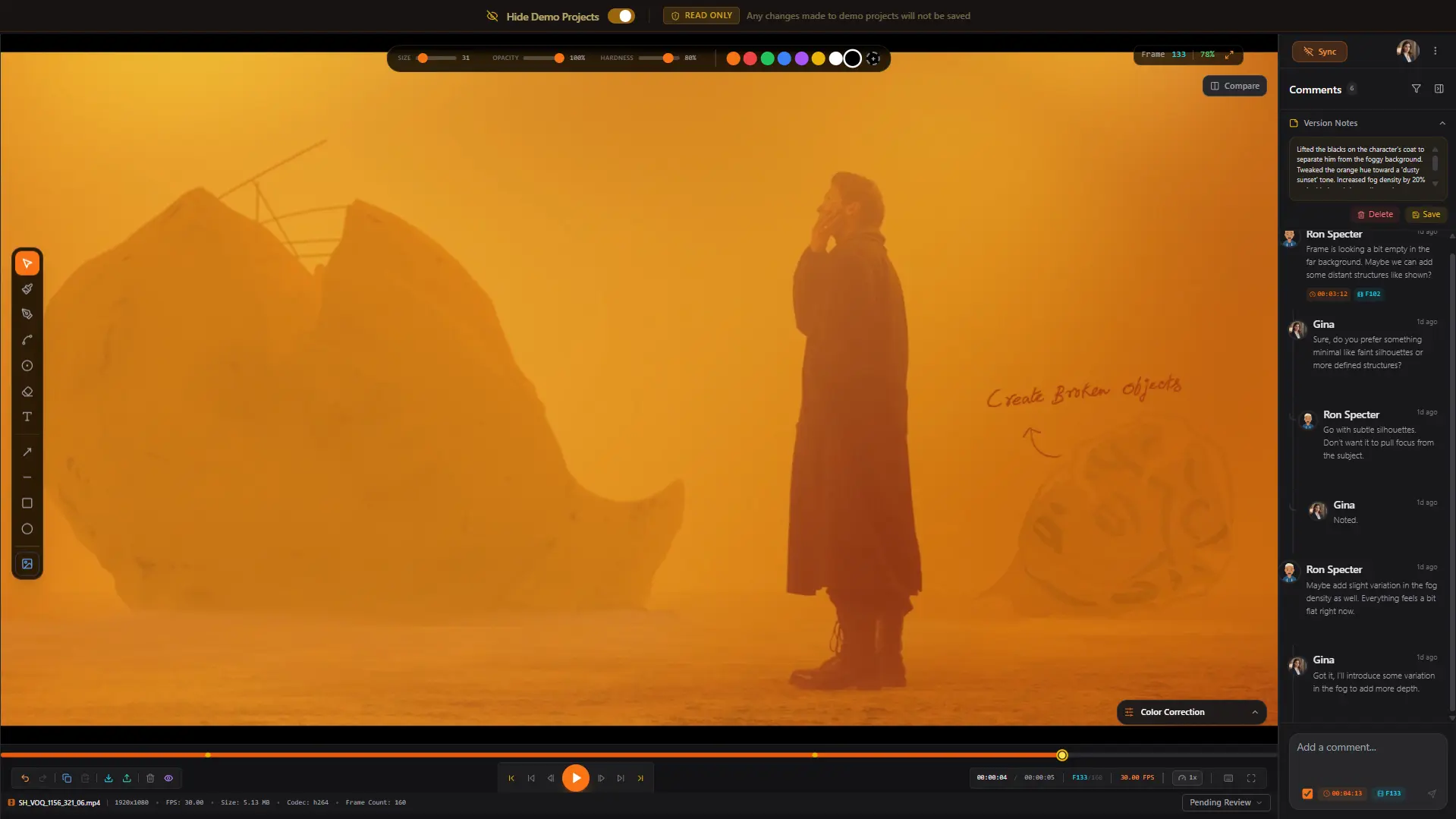
A timecode is not just a timestamp. It is an agreement between the reviewer and the artist that they are both looking at the exact same moment.
When feedback is anchored to a specific frame, everything downstream becomes cleaner. The artist does not have to guess. The reviewer does not have to over-explain. A note that reads 'the colour grade shifts slightly warmer here' pinned at 1:42:08 is far more actionable than 'somewhere in the middle section the colour feels a bit off.'
Frame-accurate feedback also respects the artist's time in a fundamental way. Every second spent hunting for the moment being referenced is a second not spent on the actual work. When a note takes the artist directly to the frame, they stay in flow and move through revisions without constantly switching context.
This is the standard creative feedback should be held to. Not approximate. Not open to interpretation. Precise.
ReviewRoom: Built by Creative Professionals
ReviewRoom was not designed by looking at the creative industry from the outside. It was built by creative professionals who spent years doing revision cycles the hard way and eventually decided the problem deserved a proper solution. A platform shaped by firsthand experience reflects the actual pain points of the work, not just surface-level inefficiencies, but the deeper frustration of feeling like your tools are constantly working against you.
Annotations Tied Directly to the Frame
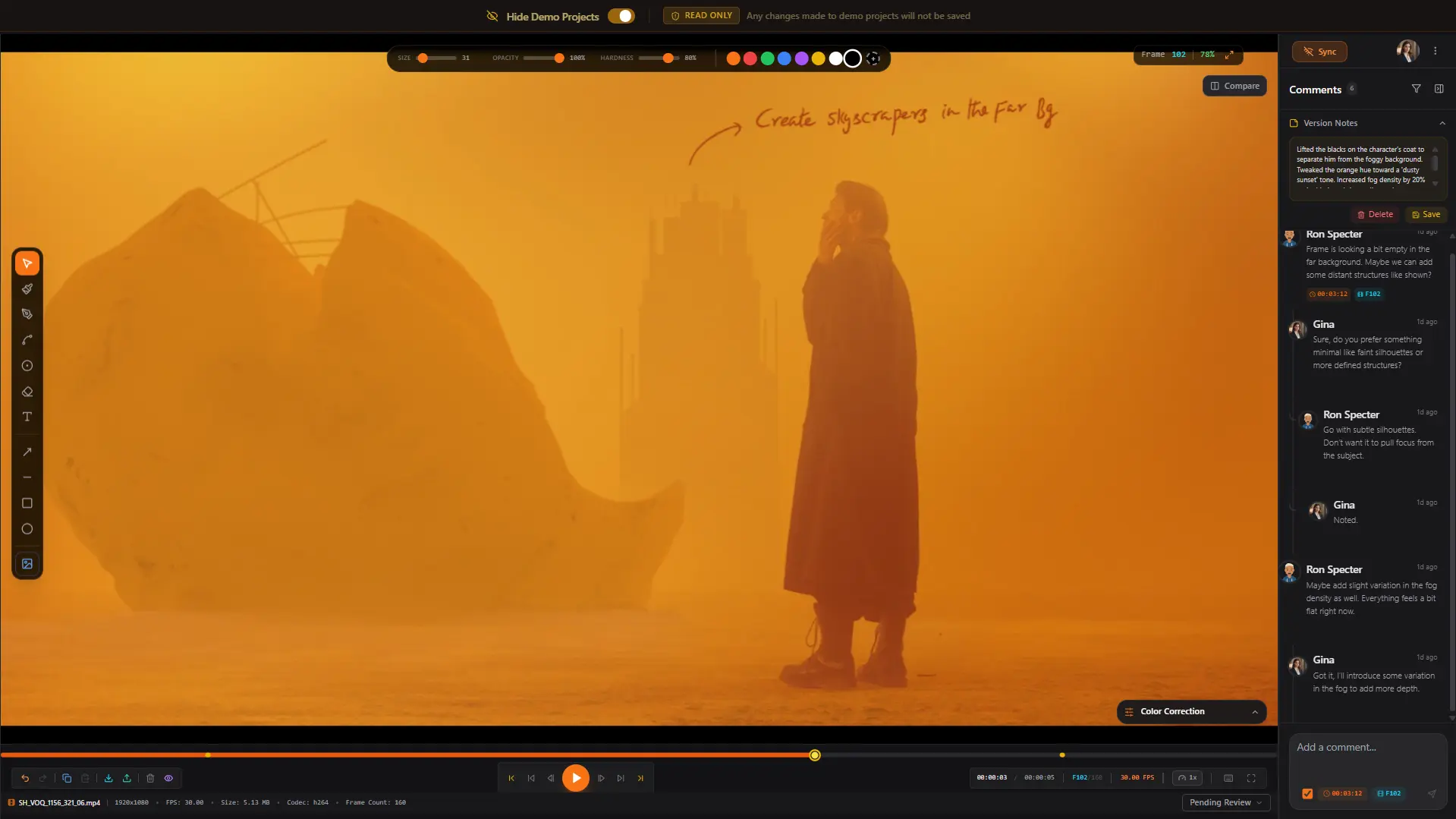
ReviewRoom gives reviewers more than ten studio-grade drawing tools with full stylus pressure sensitivity, including paintbrush, calligraphy, and smooth line tools across eight brush textures, plus arrows, shapes, and text annotations. A reviewer can draw directly on a frame, leave a timecoded note anchored to that exact moment, and every collaborator in the session sees it instantly. No screenshots. No detours through a separate annotation tool. No ambiguity about where in the timeline the note applies.
Every note is timecoded automatically. The artist sees not just the written feedback but the exact frame it refers to. They can jump there in a single click, take in the full context, and reply in the same thread, which is also timecoded. The conversation stays organised, stays close to the media, and stays visible to everyone on the project.
One Place for Everything
Because all feedback lives inside ReviewRoom alongside the media, there is no more searching through inboxes for a note from three weeks ago. Every version, every annotation, every reply is in one place. The history of a revision is readable. The reason a decision was made is traceable. The project has a record that actually makes sense.
When revisions are ready, updated files return to ReviewRoom directly. The export-compress-upload-share loop that consumes so much of a working day simply disappears. The new version sits beside the previous one, the conversation continues from where it left off, and the team can see exactly what changed and why without reconstructing it from email chains.
Communication Tools vs Creative Collaboration Software
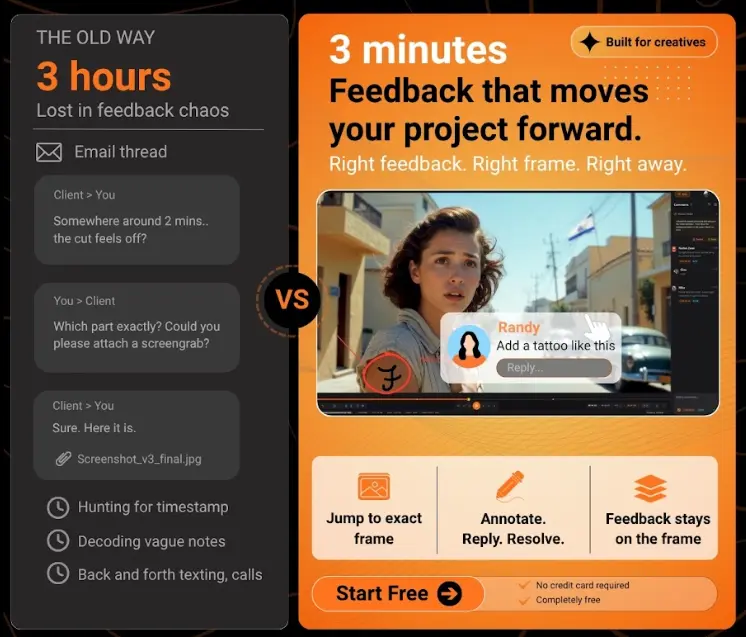
Email is a communication tool. It moves information from one person to another efficiently. That is genuinely useful. But creative work requires something beyond communication. It requires collaboration.
Collaboration means working on the same thing together. It means feedback that actively shapes the work rather than merely describing it after the fact. It means the reviewer and the artist sharing the same creative space, even when they are in different cities, even across multiple rounds of revision spread over weeks.
When a communication tool is used for a collaboration process, something is always lost in translation. The note arrives but the context does not. The instruction gets through but the nuance gets stripped somewhere between the writing and the reading. The work moves forward, but more slowly and with more rework than it should.
Creative teams are not simply passing information back and forth over email. They are shaping work together. That process is not a conversation. It is a craft. And a craft deserves tools built specifically for it.
The Right Tool Changes More Than the Workflow
Every unclear note costs a revision. Every misread comment costs an artist's time. Every version lost in an email thread costs someone hours of searching, explaining, and going again. These are not small inconveniences. Across a full production, they represent a measurable portion of the budget, the timeline, and the team's energy.
The right video review tool does not just make communication slightly more convenient. It removes entire categories of error from the process. ReviewRoom was built to eliminate exactly this kind of avoidable waste, a purpose-built video review and collaboration platform, designed around the real shape of creative work, with a free plan to get started and no credit card required.
The revisions that come from clear, precise, frame-accurate feedback are not just faster. They are better. And that is ultimately what every creative team is working toward.
Frequently Asked Questions
Q: What is the difference between frame-accurate feedback and regular video comments?
A: Regular comments attach to a rough timestamp or exist in a separate document. Frame-accurate feedback anchors a note to the exact frame, visible automatically when the video reaches that point. The artist sees not just the written note but the precise moment it refers to, with the full visual context in front of them.
Q: Can clients leave frame-accurate feedback without creating an account?
A: Yes. Clients open the ReviewRoom link, click directly on the frame they are commenting on, and type. No account, no app, no setup. The note is pinned to that exact frame automatically.
Q: How does ReviewRoom help track revisions across multiple rounds?
A: All versions, annotations, and replies live inside ReviewRoom alongside the media. You can trace the history of every decision, see why a change was made, and compare versions side by side without reconstructing it from email chains.
Try ReviewRoom free
Review your next cut without the email thread — real-time annotations, frame-accurate comments, free to start.
Start Collaborating Free