Real-Time Collaborative Review: What It Actually Looks Like
Creative teams have review pipelines. What they rarely have is a truly collaborative one. Here is the difference, and what it changes.
Creative teams have review pipelines. What they rarely have is a truly collaborative one. The distinction is significant. A review pipeline moves work from the artist to the client and back. A collaborative review pipeline ensures that both parties are reviewing the same frame, at the same moment, with feedback that is precise enough to act on immediately. Most production workflows today fall into the first category, and the gap between the two costs creative teams more time than they tend to account for.
The Real Cost of the Current Creative Review Pipeline
The standard review process in most creative studios follows a familiar sequence. The artist completes the work, renders it, compresses it, uploads it to a cloud storage folder, and sends the client a link. From that point, the process stalls.
Client time zones often overlap with artist availability by only two to three hours in a working day. When the client finally opens the link, the browser may fail to play the file, prompting a download. The client watches the file locally, notes their feedback, and sends it back, often as a voice note or an email, with descriptions like: "around the two-minute mark, there is an area behind the subject that needs to be cleaned up." The artist, reading that note out of context and possibly hours later, now has to determine which area, which frame, and what the correction should look like. A clarifying email follows. A video call gets scheduled. During the call, screen-sharing lag places both parties on different frames. The feedback still does not land cleanly. The revision begins anyway, built on interpretation rather than instruction.
The hours spent navigating this communication gap are not revision hours. They are overhead, and in a deadline-driven industry, they compound quickly. McKinsey research found that improving communication and collaboration through technology can raise knowledge worker productivity by 20–25%
Gallup research found that 48% of managers cite communication and 44% cite collaboration as their top hybrid work challenges, with teams using formal collaboration tools 66% more likely to be engaged Gallup: Managing Remote and Hybrid Workers The creative review pipeline is precisely where those gains can be captured.
What Collaborative Video Review Actually Demands
The core failure of most creative review workflows is not the intent but the tooling. Describing a visual correction in text or audio requires both parties to reconstruct the same mental image, which rarely happens with precision. Effective video review requires that everyone involved is looking at the same frame simultaneously, with tools that allow feedback to be drawn, marked, and placed directly on the image rather than described around it.
This is the premise behind real-time collaborative review, and it is substantially different from simply sharing a video link.
How ReviewRoom Enables Real-Time Collaborative Review
Uploading Professional Formats Without Double Conversion
Collaborative review cannot begin until the file is accessible, and for creative professionals working in VFX, motion graphics, or high-end post-production, file accessibility has historically been its own bottleneck.
Most cloud review platforms require artists to convert heavy files before uploading, and then transcode them again on their servers, a process that for a 4K EXR sequence or a ProRes file can take 30 to 60 minutes or longer. ReviewRoom eliminates both steps through its desktop application, which transcodes files directly on the artist's local GPU, whether NVIDIA NVENC, AMD AMF, Apple VideoToolbox, or Intel Quick Sync, converting them into browser-ready H.264 MP4s before the upload begins. Source files, including EXR sequences, never leave your machine. Only the lightweight transcoded result is uploaded, delivered through accelerated chunked transfers over a global CDN.
ReviewRoom supports ProRes (all profiles), H.265/HEVC, H.264, RAW camera files, EXR and DPX image sequences, TIFF, PNG, JPEG, PSD, MKV, MOV, and other professional formats. The upload-to-review cycle is at least 2X faster than cloud-dependent alternatives.
Sharing Work with Password-Protected Links
Once the file is uploaded, the artist shares access through a secure link. Reviewers, including clients, do not need to create an account. They enter their name and a password and land directly on the playlist the artist has assembled.
Password-protected sharing is available from the Pro plan upward. For teams handling pre-release or commercially sensitive content, ReviewRoom also supports customizable watermarks with configurable text, opacity, and positioning, domain-restricted email invites, and end-to-end encryption. Enterprise plans include Single Sign-On via SAML 2.0, multi-factor authentication, and dedicated server infrastructure isolated from other tenants.
The outcome is that the artist retains control of their work throughout the review process. Access is granted deliberately, not by default.
Sync Review Sessions: The Core of Collaborative Review
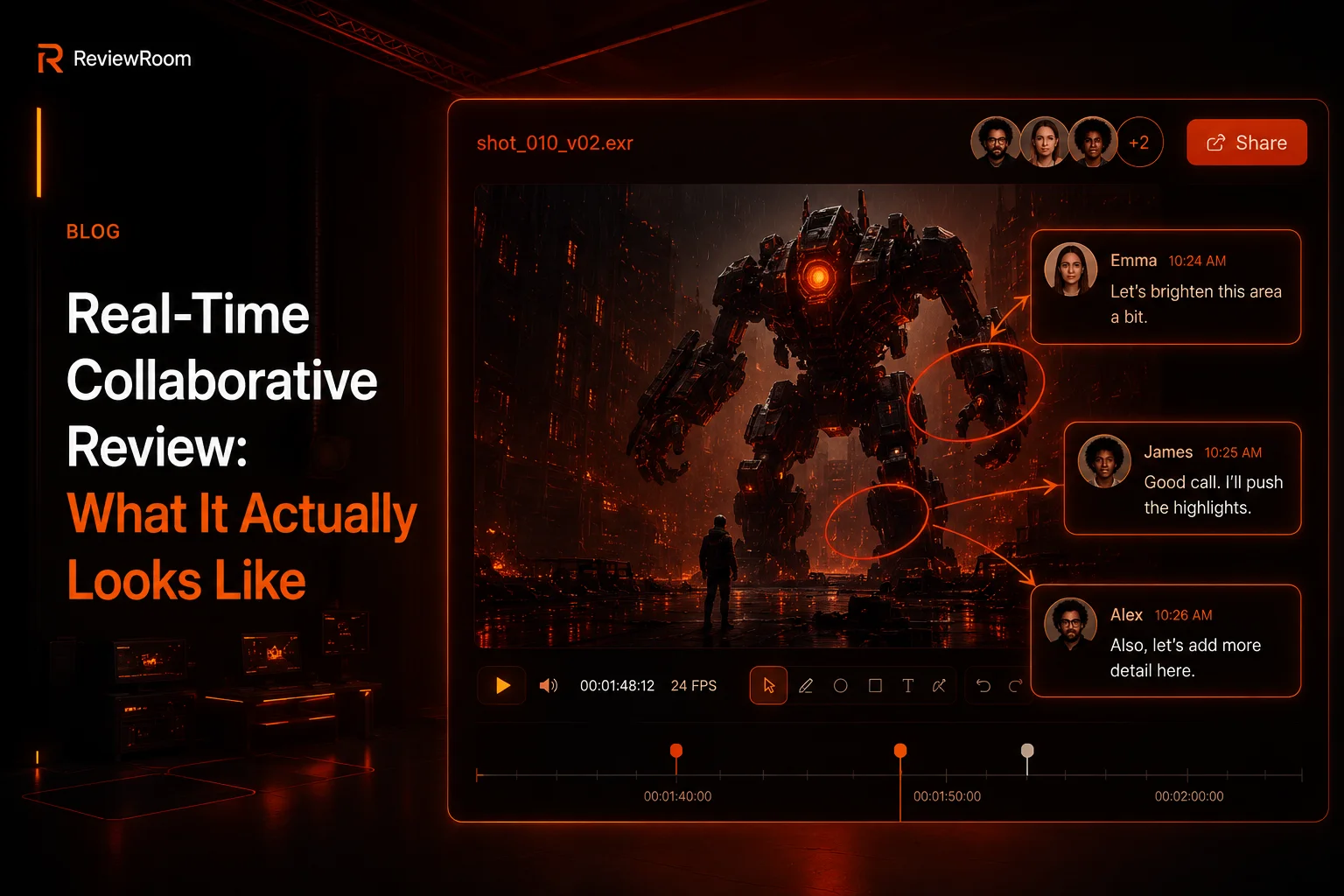
The sync review session is ReviewRoom's core feature for real-time collaboration, and it addresses the precise failure point that makes most creative review pipelines inefficient. When a reviewer enters a sync session, every action taken by the lead reviewer is mirrored across every connected screen in real time.
Playback, pause, frame scrubbing, and timeline navigation are synchronized for all participants simultaneously. The technology runs on WebSocket connections with under 100 milliseconds of latency. There is no lag, no frame mismatch, no participant stuck on a frame the rest of the group has already passed.
Unlimited collaborators can join a single session. A director, a client, a VFX supervisor, and a producer can all be present in the same session without per-seat restrictions on the reviewer side.
Frame-Accurate Annotations That Sync in Real Time
ReviewRoom includes more than ten studio-grade drawing tools, paintbrush, calligraphy, smooth line, arrows, shapes, and text, with stylus pressure sensitivity across eight brush textures. When a reviewer draws on a frame, that annotation appears on every connected screen the moment it is placed.
The outcome this produces is significant. The vague note about a problem "around the two-minute mark" is replaced by a drawn mark on exactly the frame in question, visible to every participant in real time. The feedback is no longer a description that requires interpretation. It is a visual instruction placed precisely where it belongs. Artists report fewer clarification exchanges, shorter revision rounds, and reviews that conclude with actionable notes rather than open questions.
Threaded Timecode Comments for Clear Revision Notes
Every comment is timestamped to the specific frame it references. Rather than a general comment thread that has to be cross-referenced against the timeline, the artist has a frame-by-frame log of what needs to change and exactly where.
The practical difference at revision time is considerable. Instead of starting the next working day by re-watching the file and trying to match notes to frames, the artist opens the session, reads the timecode comments in order, and begins the work.
Supporting Tools That Round Out the Workflow
ReviewRoom's annotation suite also includes wipe, opacity blending, and side-by-side comparison modes for version review, real-time color correction tools, and frame navigation with undo/redo and copy/paste annotation support.
After a session, feedback exports as full-resolution annotated PNGs, a compiled PDF feedback report, a collected comments and notes file, or the transcoded MP4. For studios that document approval stages across multi-round projects, the PDF export creates a clean record of every note without manual summarization.
The Review Process That Gets Out of the Way
A review tool should not be the hardest part of the review. It should be the part that makes everything else easier. When feedback is precise, placed directly on the frame, and visible to every participant in real time, the process that normally consumes hours of a creative team's week compresses into a single focused session.
Revision rounds become shorter. Project timelines tighten. And the relationship between artist and client shifts from one mediated by miscommunication to one built on a shared view of the work.
See synchronized review in action at reviewroom.studio Free to start, no credit card required.
Try ReviewRoom free
Review your next cut without the email thread — real-time annotations, frame-accurate comments, free to start.
Start Collaborating Free